01
Load the whole rig.
Combine several instrument and MIDI effect plugins in a single instance.
Floof Station / Plugin combiner
Your plugins. One playable chain.
Chain and blend instruments and MIDI effects inside Floof Station. Build a whole rig on one DAW track, then play it as one.
Win + Mac / VST3 · AU
Full plugin trial / No account needed
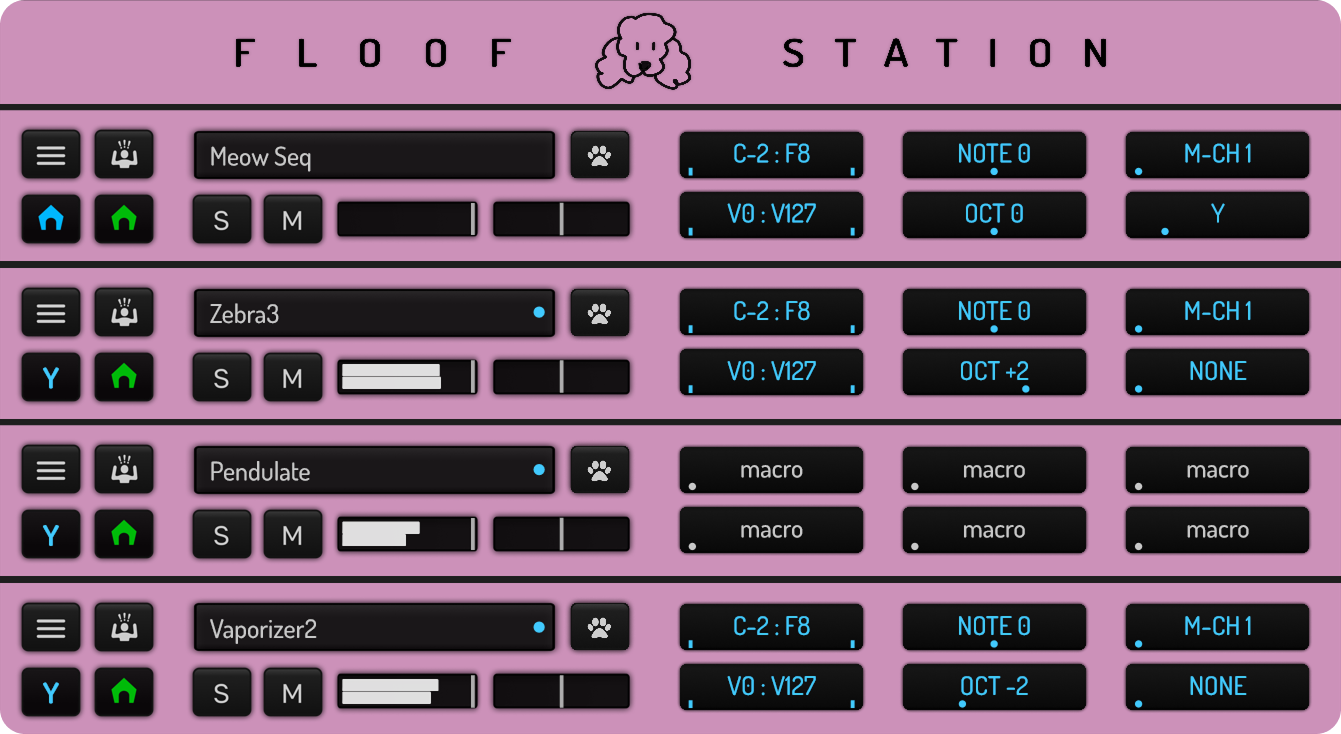
01 / A home for your plugins
Stack MIDI effects before an instrument, combine your favorite tools, and keep the chain together in a single place. Meow Seq and Paw Control fit right in.
A slot up close / Six controls for the MIDI flow
C-2:F8
Choose the lowest and highest notes for this slot.
NOTE 0
Transpose notes up or down.
M-CH1
Set the MIDI channel for this slot.
V0:V127
Choose which note velocities pass through.
OCT 0
Shift notes up or down in whole octaves.
Y
Choose where the slot sends its output.
02 / Put the chain to work
01
Combine several instrument and MIDI effect plugins in a single instance.
02
Decide what feeds what, with note and channel ranges for each slot.
03
Assign macros across the chain and control related parameters together.
04
Use Floof Station as a VST3 or AU plugin in a compatible host.
03 / See it in action
Watch a quick breakdown of the interface, routing, and how the parts work together.
A note before you buy
Install the trial and let Floof Station scan your plugin folders. Check that the instruments and MIDI effects you use load and behave as expected before buying.
Audio effect plugin support is in development
04 / Build something of your own
The trial is fully functional. Give it a place in your own setup before you decide.
Windows + macOS / VST3 · AU